Performance Monitoring by XPLUS
Stop guessing why Dynamics 365 is slow
SQL, AOS and Batch stop being three separate islands of data. One correlated view shows exactly where the problem is, before your users report it.
Real-time data
Dashboard visualization
Custom metrics
Challenges
Standard Dynamics 365 performance monitoring just isn’t enough
Microsoft’s built-in performance monitoring metrics are siloed and limited. While LCS and Application Insights are valuable tools for infrastructure health and telemetry, they lack the depth required for robust performance engineering. This leads to a number of critical issues:
“We know Dynamics 365 is slow – but we don’t know where and why.”
SQL, AOS, and Batch are all monitored separately, with no native Dynamics 365 tools to correlate information. This makes it very difficult to diagnose the root cause of performance issues.
“Microsoft’s in-built tools simply don’t have the information we need.”
Native Dynamics 365 performance monitoring tools don’t show important details like query plans, Query Store insights, query plan and lock analysis, and table growth trends. This makes serious performance troubleshooting nearly impossible.
“Regressions after One Version updates are causing performance issues.”
After updates, it’s difficult to spot regressions without testing the entire system. At the same time, there’s no baseline to compare before vs. after – meaning it’s impossible to work out when or why performance has dropped. After updates, performance often gets worse or the system breaks entirely.
Solutions
Improve performance, reduce risk, and cut inefficient processes
XPLUS takes your business from risky guesswork to proactive performance monitoring, so you can prevent issues, rather than reacting to them. We give you clear insight into how Dynamics 365 actually works, so you can identify what’s really affecting performance – and eliminate them.
Get better and deeper analytics
Extend Microsoft’s built-in performance monitoring tools, with extra metrics like Query Store statistics, lock/blocking analysis, and table growth trends.
All your Dynamics 365 metrics in one place
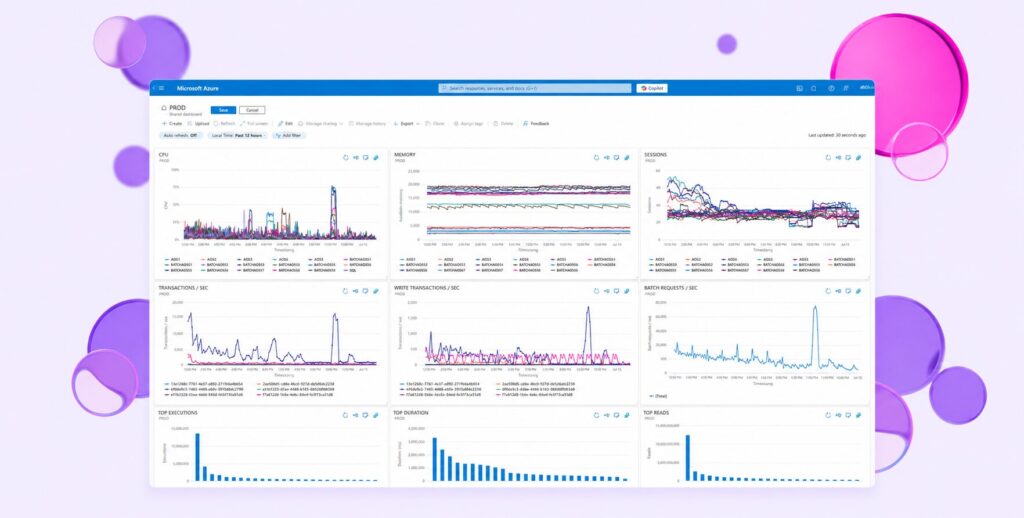
Performance Monitoring by XPLUS gathers metrics from SQL, AOS, and Batch, then writes them to Azure Log Analytics and visualizes them in Azure Dashboards. This enables you to quickly identify what’s causing delays, downtime, and other performance issues in Dynamics 365.
Quickly spot regressions
Move from reactive firefighting to proactive performance management. With detailed information into I/O consumption, execution plans, and regression patterns, you’ll be able to quickly diagnose performance issues after updates.
Add custom metrics
The product also allows you to add custom metrics via SQL scripts, without requiring changes to the application code. This enables you to collect and monitor KPIs specific to your business processes and test scenarios.
Proactive alerts keep you in control
Email and SMS alerts give you the information you need, when you need it – without continuous, passive monitoring. Define custom thresholds so you can control what alerts you get and when. This gives you the tools to spot and solve performance issues before your end users do.
Monitor production and sandbox environments
Performance Monitoring by XPLUS works in both production and sandbox environments. At the same time, it can run standalone or side-by-side tests – ensuring your Dynamics 365 system is properly monitored, wherever or however it’s configured.
Product
Take charge of your Dynamics 365 processes
Performance Monitoring by XPLUS
Performance Monitoring is a real-time data collection and visualization layer for Dynamics 365 F&SCM. It extends Microsoft’s underlying functionality to give you granular insights into Dynamics 365 performance.
- Identify regressions
- Diagnose performance issues
- Improve Dynamics 365 performance

From reactive to preventive: how one of Europe's largest automotive parts distributors got ahead of ERP performance issues
A Warsaw Stock Exchange-listed distributor running Dynamics 365 F&O, with a growing web of integrations, moved from finding out about performance problems from users to catching them before they reach the warehouse floor.
Contact us
Your partner in all things Dynamics 365
XPLUS is the only organization to combine hands-on Dynamics 365 implementation projects with automated tools for testing, security, and observability. Contact our team to find out what we can do for you.